DeskScene 2.0
Autumn 2026
A rebuild from the ground up: profiles become scenes, and DeskScene learns to restore your windows by itself after docking and undocking.
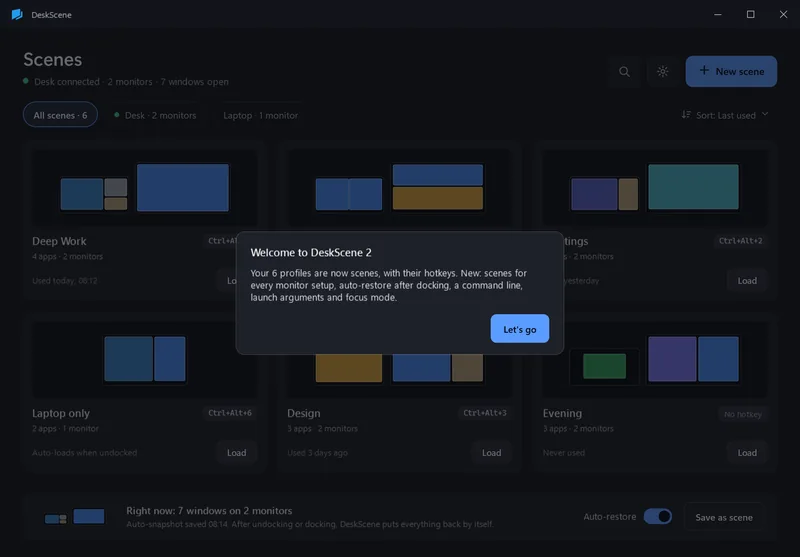
New
- Auto-snapshots and auto-restore. A snapshot of your windows every few minutes, after moving windows, before sleep and lock. After docking or undocking DeskScene restores the last snapshot of that monitor setup – or loads the scene you linked to it.
- Command line and desktop shortcuts.
deskscene --load "Deep Work",--restore-last,--snapshot,--list, with exit codes for scripts, Stream Deck and the Task Scheduler. One click puts a shortcut for a scene on the desktop. - Launch arguments and admin start per app. Open a folder, a file or a URL; set a working directory; run an app as administrator. Windows of administrator apps are detected and reported, with “Restart DeskScene as administrator and load”.
- Focus mode. Minimize every window that is not part of the scene, with Undo.
- Monitor setups recognized by their EDID ids, so two desks with the same resolutions stay apart.
- Scene editor with a map of your monitors: drag and resize windows, snapping to edges, halves and thirds.
- Tray flyout with all scenes, auto-restore and focus mode; history of everything DeskScene did on its own.
- Store apps (packaged apps) are captured and started too.
Changed
- Profiles are now called scenes. Your version 1 profiles, hotkeys and monitor profiles are imported on the first start; the old files are left untouched.
- Hotkeys are free per scene (any combination, conflicts are shown), not only modifier + 1–9.
- DeskScene waits up to 20 seconds for apps it starts (version 1: 2.5 seconds) and starts them in parallel.
- New dark design, English and German switchable live.
- A paid app with a 15-day free trial through the Microsoft Store: €9.99 once, all 2.x updates included.
